This video tutorial has been acquired from Downloadtube.com
Review
This is official description applies to version 6.7
Actual Window Manager is an innovative desktop organization application which introduces unconventional window controls. Features : - placing windows exactly to the required place - sizing them exactly as they should be - keeping the important windows always-on-top of others
The following review written by one of the Software Informer contributors applies to version 5.4
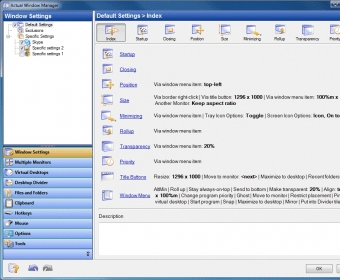
Actual Window Manager is a handy and simple application that offers multiple options to manage active windows. The program sits silently in your system tray, allowing you to keep your taskbar uncluttered, especially when you work with multiple windows. The application features a nice and intuitive user interface that includes a list of the programs you have installed on your PC, with the available options to configure the appearance of windows. The program is rather easy to use, but if you are a beginner you can always read its comprehensive help file. It is ideal for easily switching between multiple windows or monitors. Also it is ideal if you use any scripting tool for moving and sizing windows and want to add more functionality. The program also has the ability to remember the last position and size of every window, and allows you to configure lots of behaviors. You can also assign a global keyboard shortcut to every single function the program makes available, and reorder taskbar buttons by dragging and dropping them. It also attaches a small toolbar in the upper-right corner of windows, which includes options to minimize a window to tray, make it transparent, set it to stay on top and other actions. If you are looking for a way to bring automation to windows' behaviors, you should give Actual Window Manager a try.
Easy to use.
Nice and intuitive user interface.
Multiple options.
Fully customizable.
Many new features.
None.
Reviewed by: Silvana Mansilla
Reviewer rating:
Reviewed: 2 years ago
What's new in version 6.7
The quality of multi-monitor wallpaper pictures is improved in Windows 7. - In Aero visual theme, Multi-monitor Taskbar's color is now exactly the same as the system taskbar's. - Delay before activating a preview when moving the mouse within a multi-preview for a grouped task is added (for now, it's hard-coded to 200 ms). - The Scroll Inactive Windows feature stopped working in previous update. - Activating the maximized windows from secondary taskbars forced them back to a normal state. - Sometimes the dwm.exe process crashed. - Window icon and caption did not update in preview thumbnails.
What's new in version 6.6
Ability is added to hide secondary taskbars per monitor: right click the taskbar and select the "Hide taskbar" command in its context menu. You can restore the taskbar via "Taskbars" submenu in Actual Window Manager tray icon's context menu.
Controls on secondary taskbars (Start button, notification area, clock) can be toggled per taskbar: right click the taskbar and select the required item in its context menu.
What's new in version 5.4
The core engine has been slightly improved: now startup actions
are applied to a window before it becomes visible so there will be
no annoying blinking when changing window's position/size upon its startup.
The Windows 7 Aero Snap emulation is added.
Now you can turn off the buttons re-ordering mode for the primary Taskbar.
Now you can re-order buttons on the primary Taskbar even if the "Group similar taskbar buttons" option is enabled.
Now the primary Taskbar buttons re-ordering works under Windows 2000.
Virtual Desktops Switcher window is added.
Windows Thumbnails feature is added.
Virtual Desktops panel is slightly redesigned: - background and hotkey settings are divided onto separate tabs; - the Switcher settings group is added.
Configuration user interface has been slightly changed: Virtual Desktops
and Desktop Profiles panels are now grouped in the main window with the
Window Settings panel.
The ability to set up multi-monitor wallpaper/screen saver immediately
(without the need to create and activate certain desktop profile) is added.
Multi-monitor Taskbar extension is now compatible with Windows 7.
Now the Multi-monitor Task Switcher extension is compatible with the TaskSwitch XP PowerToy utility.
Conflicts with the following products have been fixed: - Microsoft NetMeeting - NetOp Remote Control (Host) - RAdmin Server - Ad Muncher - Calendar Magic - Microsoft Flight Simulator X
The bug is fixed: in full screen applications (like games) title buttons were though invisible but still active and responded to mouse clicks.
The bug is fixed: the Multi-monitor Taskbar/Task Switcher windows disappeared in Windows 7 when the Aero Peek was activated.
What's new in version 5.3
Virtual desktops support the extra multi-monitor settings for their wallpapers.
"Start Program" action.
You can manually order the buttons on secondary taskbars as well as on the primary one using the simple mouse drag-and-drop.
Description field added for Default settings and for Exclusions.
Quick alignment of windows.
Multi-monitor Taskbar extension supports the Auto-hide and Lock features on the per monitor basis.
What's new in version 5.3 beta
Virtual desktops support the extra multi-monitor settings for their wallpapers.
"Start Program" action.
You can manually order the buttons on secondary taskbars as well as on the primary one using the simple mouse drag-and-drop.
Description field added for Default settings and for Exclusions.
Quick alignment of windows.
Multi-monitor Taskbar extension supports the Auto-hide and Lock features on the per monitor basis.
What's new in version 5.0
1) The support for command prompt (a.k.a. console/CMD/DOS) windows in Windows 2000/XP/2003/Vista is added. 2) The full support of native 64-bit applications running on any Windows x64 platform is added. 3) The ability to change the default window icon to a selected one is added.